Preview mode. Drawing and saving work here; AI images need your hosted app.
Opening the backyard drawing tools…
Draw where the wall goes.
Start on the overhead site plan. Draw on the ground around the house.
ROOFTOP · LAND ESTIMATED
Dashed frame = original photo edge. Outside it, land is AI-estimated—not a property boundary.
Draw on the ground with your finger. Pinch to zoom.
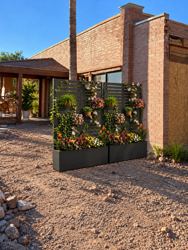
Dr. Safdar’s flower-wall styleDark horizontal slats · flowers · black planters
No walls yetSaved on this device
Preview & saved layouts
The original overhead stays fixed inside the dashed frame. Extra terrain is an AI illustration; it does not establish available land or property lines. The whole-house footprint follows the original overhead reference. Roof edges are approximate and heights are illustrative. No real measurements are derived from this image. Record agreed dimensions in Show Contractor.
Visual proportion only — not feet or measured height.
Saved ideas on this device
Favorite idea
Original photo
Keep the original. Add estimated surroundings before drawing your wall.
Draw the wall’s base on the ground
Your line is where the planters touch the ground—not an area to fill. You’ll see the wall placement before AI runs.
Other photo options
General ideas can alter the entire photo. Use the wall-route tool for controlled placement. Wider/top views are estimates, not the same measured route.
Zoomed out contractor view automatically uses the whole-property overhead image and all included house photos to create a wider site-context picture. Wider and top views are illustrative, not measured reconstructions.
Make a realistic picture
Optional. Try the layout in 3D first; then ask AI to render it.
Reference photo & instructions
The approved flower wall is already included. Add only screenshots of new ideas.
Your new idea
AI interpretation
Check the result against your layout. AI may change details; your editable 3D layout is unchanged.
This is your visual check, not a measurement or automatic AI verification.
Show Contractor
Working idea · Not approved
The drawn route and written notes control this design. Pictures illustrate the look; they do not supply measurements. Surrounding land outside the dashed photo frame is AI-estimated, not surveyed.
Flower wall to matchDark horizontal slats · flowers · black planters
Additional picture (not the layout)
Notes & measurements
Only mark a measurement checked after it has actually been checked. The app records your entry; it does not verify it.
Record approval — after the meeting
Leave this as a draft until Dr. Safdar has reviewed the exact route, pictures and notes. This records design intent only, not permission to begin construction.
Saved contractor versions
Frozen copies on this device. Editing the design creates a draft; it never changes a saved approved version. Download the PDF to keep an external copy.